Cuestomize Introduction
Cuestomize is a Kubernetes Package Manager using CUE-lang and integrated in Kustomize.
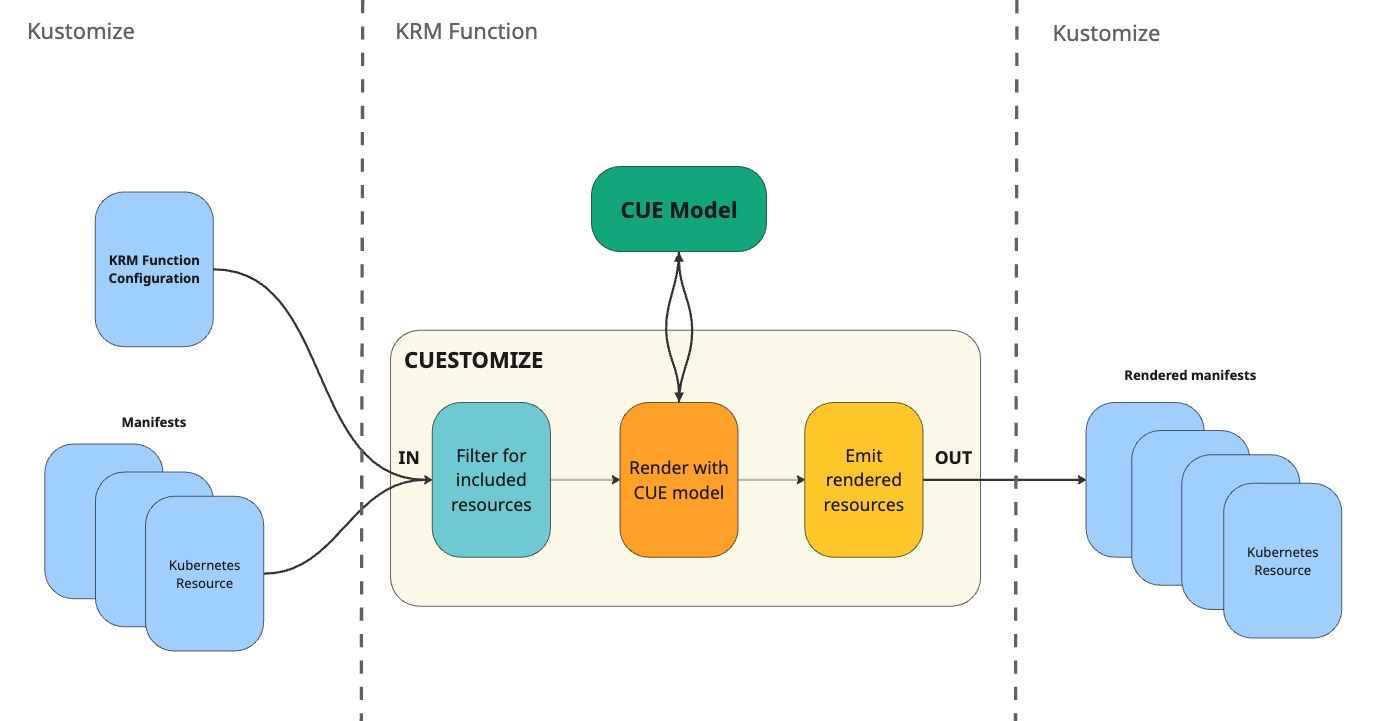
It is implemented as a Kustomize KRM function that reads a CUE model, and optionally some input resources from the Kustomize stream, generates some manifests, and passes them back to the Kustomize stream.
It provides the type-safety of CUE and the flexibility of kustomize, combined in a single tool.
Moreover, it allows your CUE model to consume resources from the Kustomize stream, which can be used to feed the CUE model with additonal contextual data.
This means with Cuestomize you have two ways to pass input data to your CUE model:
- the
inputsection of the KRM function’s specification (similar to Helm values) - resources from the Kustomize stream.
The CUE model can then use the input values and resources to generate the output manifests.
The CUE model can either be pulled from an OCI registry, or be local to the KRM function (in which case you need to build and image that bundles both the CUE model and the Cuestomize binary).
Features
- Type-safety: CUE is a strongly typed language, so you are guaranteed that the generated resources are valid from a schema point of view.
- Flexibility: Kustomize is a very flexible tool, and Cuestomize lets you leverage that flexibility by being integrated in Kustomize, while still having the benefits of CUE.
- Modularity: CUE models can be composed together, so you can build complex models by combining simpler ones.
- OCI support: CUE models can be pulled from OCI registries, making it easy to share and reuse them.
- Validation: Cuestomize, leveraging CUE, gives you the power to validate your manifest generation process from end to end. You can validate both the input data and the generated resources against their respective schemas.
With Cuestomize, you won’t suffer from YAML indentation issues or misspelled fields anymore. If an unexpected field is found, or a required field is missing, CUE will raise an error during the evaluation of the model, preventing the generation of invalid manifests.
How it Works
Cuestomize is implemented as a Kustomize KRM function. It reads its configuration (and optionally other manifests) from the Kustomize input stream, unifies them with a CUE model of your choice, collects the model’s outputs, and passes them back to Kustomize.
Visual Example Representation
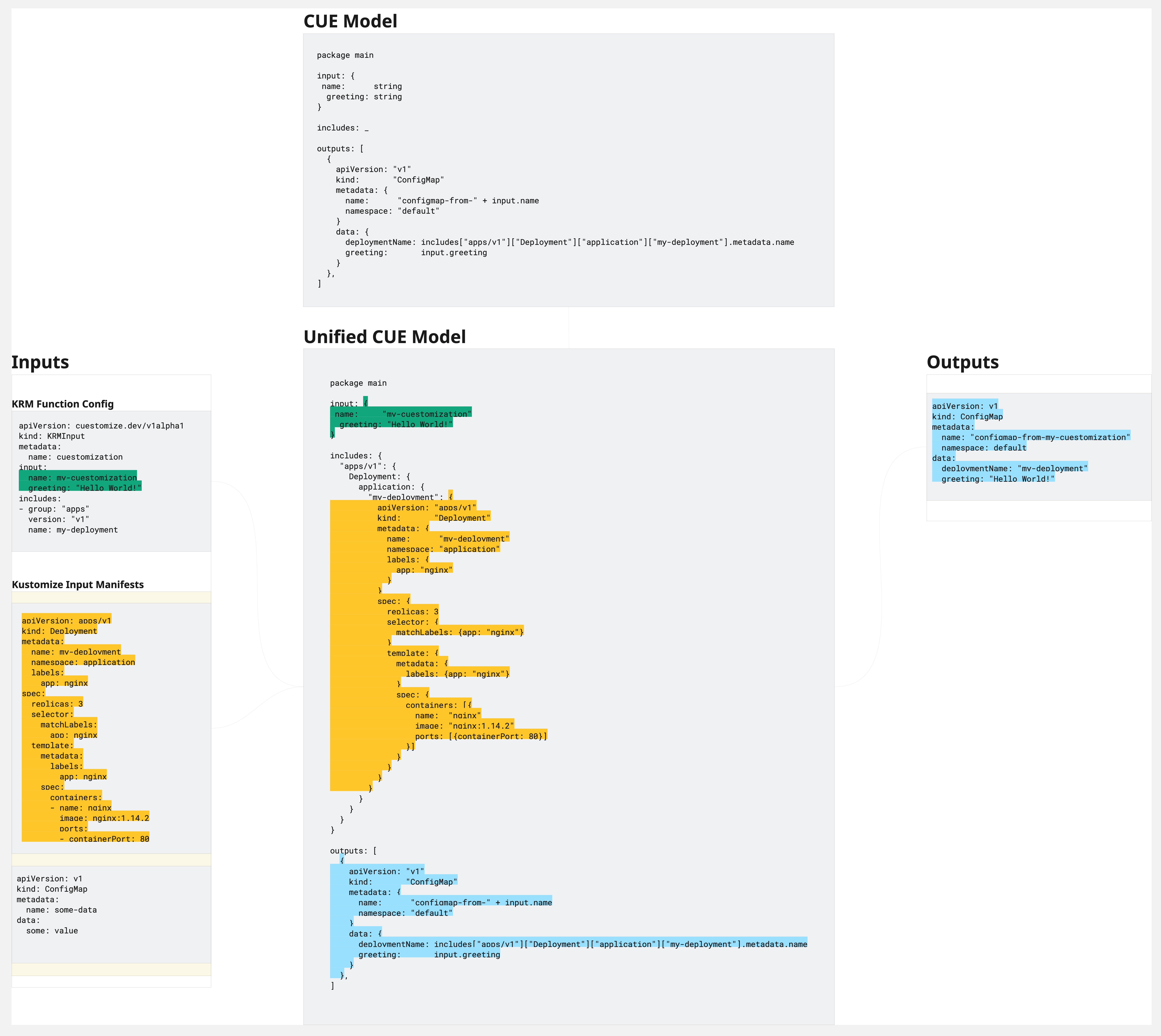
A practical example of how data are passed and manifests generated is shown below.
Say that you have a CUE model that generates a ConfigMap with data taken from the input values, and a Deployment and a Service that are expected to be present in the Kustomize input stream.
Input Stream
On the left side of Figure 2, you can see the Kustomize input stream, which contains:
- the Cuestomize KRM function configuration, which specifies the CUE model to use, the input values to pass to the model, and which resources from the stream to forward to the model
- the other manifests from the Kustomize input stream.
CUE Model Unification
In Figure 2, on the center-top, you can see the CUE model that the function will use to generate the manifests.
In the center, you can see how the unified CUE model – i.e. the resulting CUE configuration after inputs and includes are forwarded to the model – would look like:
- the
inputfield contains the input values forwarded from the function configuration - the
includesfield contains the resources forwarded from the Kustomize input stream, in a map for ease of access - the
outputsfield contains the generated resources, the ConfigMap in this case, which will be collected and passed back to Kustomize by Cuestomize.
Output Stream
On the right side of Figure 2, you can see the manifests that are collected by the function, only the ConfigMap in this case. The outputs manifests are then passed back to Kustomize, which can further process them.
Getting Started
This section will guide you through the steps to get started with Cuestomize.
The CUE Model
To get started with Cuestomize, you need to create a CUE module that defines your manifest generation logic.
You can either create your own CUE model from scratch, or use an existing one.
How to create CUE models that are compatible with Cuestomize is explained in different sections of this book, so we will use one of the existing models for this example.
The Kustomization
You need to have a Kustomization directory that you can use to run Kustomize.
In this directory, you need to create a kustomization.yaml file that defines the resources you want to manage with Kustomize.
How to create a Kustomization project is out of the scope of this book, so we will assume you already have one, and the next steps will assume you are using the one under examples/simple/kustomize.
In your kustomization directory, you need to add a file that holds the configuration of the KRM function that will run Cuestomize. The name you give to this file is not important, as long as you reference it in the transformers section of your kustomization.yaml file.
Create the KRM Function Configuration File
Change directory, and create a file named krm-func.yaml in the kustomization directory:
# We assume you have git cloned the repo locally and are in the root directory of the repo
cd examples/simple/kustomize

touch krm-func.yaml
Note: the name you give to this file is not important, as long as you reference it in the
transformerssection of yourkustomization.yamlfile.
Update the Kustomization File
Edit the kustomization.yaml file to add the krm-func.yaml file to the transformers section:
kind: Kustomization

# ... other sections ...

transformers:
  - krm-func.yaml
Configuring the KRM Function
Edit the krm-func.yaml file to configure the KRM function that will run Cuestomize.
Here is an example configuration:
apiVersion: cuestomize.dev/v1alpha1
kind: Cuestomization
metadata:
  name: example
  annotations:
    config.kubernetes.io/function: |
      container:
        image: ghcr.io/workday/cuestomize:latest
        network: true
input:
  configMapName: example-configmap
includes:
- group: apps
  version: v1
  kind: Deployment
  name: example-deployment
  namespace: example-namespace
- version: v1
  kind: Service
  name: example-service
  namespace: example-namespace
remoteModule:
  ref: ghcr.io/workday/cuestomize/cuemodules/cuestomize-examples-simple:latest
Note: Cuestomize does not constrain the
apiVersionandkindfields of the KRM function configuration, so you can use whatever values you want, as long as they are valid Kubernetes resource names. In your CUE model, on the other hand, you can constrain these to specific values in order to ensure compatibility between the model and the function’s configuration.
Running Kustomize to Generate the Manifests
Now that you have everything set up, you can run Kustomize to generate the manifests.
Since Cuestomize is a KRM function, you’ll need a few extra flags in order for kustomize build to work properly:
--enable-alpha-pluginsto enable the KRM function--networkif your CUE model is pulled from a registry (can be omitted if the model is local to the function’s image).
Build the Manifests
kustomize build . --enable-alpha-plugins --network
You should see the build to be successful, and the CUE-generated manifests within the printed manifests.
Function Configuration Reference
This section documents all configurable fields for a Cuestomize KRM function configuration.
KRM Function Configuration
| Field | Type | Description |
|---|---|---|
apiVersion | string | API version. Unconstrained by default (CUE model can constrain it) |
kind | string | Kind. Unconstrained by default (CUE model can constrain it) |
metadata | object | Standard Kubernetes metadata. |
input | object | (Optional) Input sent to the model. Shape configured in the model itself. |
includes | object | (Optional) Additional resources to include in the CUE model. |
remoteModule | object | (Optional) Remote CUE module configuration (OCI or CUE registry). |
Metadata
The metadata field of the configuration must contain some annotations in order for kustomize to recognise it as a KRM function.
On top of that, Cuestomize offers some configurations options through the .metadata field.
All these options are documented below.
Annotations
.metadata.annotations
| Annotation | Description |
|---|---|
config.kubernetes.io/function | Contains the KRM function configuration. |
config.cuestomize.io/validator | If set to "true", tells the function to use the CUE module for validation only |
Annotation – config.kubernetes.io/function
The annotation config.kubernetes.io/function is the one used by kustomize to configure a KRM function (kustomize docs).
Its value must contains the configuration for the container that runs the KRM function.
metadata:
  name: my-config
  annotations:
    config.kubernetes.io/function: |
      container:
        # the Cuestomize image you want to use
        image: ghcr.io/workday/cuestomize:latest

        # this is required to pull the CUE module from a registry
        network: true
⚠️ Passing environment variables to KRM functions is a discouraged practice (and may be removed in future kustomize versions), but is documented here for completeness. It also may be useful when developing to quickly iterate, without having to change the configuration.
The KRM function configuration also accepts environment variables to be passed to the container running the function, although that is discouraged and may be removed in future kustomize versions.
Cuestomize allows you to configure the logging level and pass the credentials for private registries through environment variables.
| Variable name | Description |
|---|---|
LOG_LEVEL | The logging level (default: warn) |
REGISTRY_USERNAME | The registry to pull the CUE module from username |
REGISTRY_PASSWORD | The registry to pull the CUE module from password |
Annotation – config.cuestomize.io/validator
Setting config.cuestomize.io/validator: "true" in the configuration annotations tells Cuestomize to use the CUE module as a validator only: it will unify the inputs and includes with the module, but it won’t collect the outputs.
This is useful if you want to validate a set of manifests with some CUE constraints, e.g. ensuring that all Deployments use a particular securityContext, or that resources in certain namespaces has a particular label, etc.
When used in validator mode, CUE will be used to validate, instead of to generate, and the behaviour you can expect is the same as running cue eval command.
Input
Input is an object whose shape depends on the CUE model you are integrating with.
The CUE model creator (yourself, or a third party) defines the shape of the input directly in the model itself.
The allowed shape and values for the input are entirely dependent on the CUE model constraints the model imposes.
For example, if the CUE model defines the input as:
# Input schema defined in the CUE model (each model defines their own)
input: {
    name: string
    replicas: int | *1
    region: "us-west-1" | "us-east-1" | "eu-central-1"
}
the input section of the KRM function configuration must conform to that shape:
# valid input section
input:
  name: my-app
  replicas: 3
  region: us-west-1
On the other hand, the following input would be invalid, and Cuestomize would raise an error at runtime:
# invalid input section
input:
  name: my-app
  replicas: "three" # invalid: defined as integer in the CUE model
  region: ap-southeast-1 # invalid: not one of the allowed values
As you can see, the input section is entirely dependent on the CUE model, if you change the model, the shape of the input must be updated accordingly.
Includes
The includes field is the one that ties with the concept of includes in Cuestomize.
Includes, in Cuestomize, are an advanced feature that allows you to forward resources from the Kustomize input stream to the CUE model, to be used as additional input.
The power lies in the ability to let CUE “infer” some values from the kustomize stream, without forcing the user to pass them explicitly through the input section. For example, you may want to forward the Namespace resource from the kustomize stream to the CUE model, so that the model can use the received Namespace’s name to set the namespace of the generated resources, or to read and use some labels or annotations from it.
The includes field is a list of resource selectors, and resources matching one of the selectors will be forwarded to the CUE model in the includes field.
Remote Module
| Field | Type | Description |
|---|---|---|
auth | object | (Optional) Resource selector for secret containing credentials |
ref | string | The full OCI reference in the format registry/repo:tag |
registry | (Deprecated) ghcr.io, docker.io) | |
repo | (Deprecated) | |
tag | (Deprecated) | |
plainHTTP | bool | (Optional) Whether to use plain HTTP instead of HTTPS |
Auth
| Field | Type | Description |
|---|---|---|
kind | string | (Optional) Must be unspecified or Secret |
name | string | (Optional) Name of the resource containing the credentials |
namespace | string | (Optional) Namespace of the resource containing the credentials (defaults to the KRM function namespace) |
annotationSelector | string | (Optional) Annotation selector to filter the resources |
labelSelector | string | (Optional) Label selector to filter the resources |
At least one of the fields must be specified to match an auth secret in the kustomize input stream.
If multiple secrets match the provided selector, one will be chosen – with no guarantee provided on which one.
Example
apiVersion: cuestomize.dev/v1alpha1
kind: Cuestomization
metadata:
  name: example
  annotations:
    config.kubernetes.io/function: |
      container:
        image: ghcr.io/workday/cuestomize:latest
        network: true
input:
  configMapName: example-configmap
includes:
- group: apps
  version: v1
  kind: Deployment
  name: example-deployment
  namespace: example-namespace
- version: v1
  kind: Service
  name: example-service
  namespace: example-namespace
remoteModule:
  ref: ghcr.io/workday/cuestomize/cuemodules/cuestomize-examples-simple:latest
Pull From OCI Registry
Cuestomize can fetch CUE modules directly from an OCI registry (such as Docker Hub or GitHub Container Registry). This allows you to share and reuse CUE logic across projects and teams, and makes distributing your CUE models easier.
To pull a CUE module from an OCI registry, specify the remoteModule field in your Cuestomize KRM configuration.
Both public and private registries are supported.
Module Pull From Public Registries
Module Pull From Public Registries
ⓘ No auth is required for public modules.
To pull from a public registry, you just need to configure the function on where the CUE module to pull is stored, and which tag you want to pull.
You can do this by specifying a remoteModule field in your Cuestomization resource, like so:
apiVersion: cuestomize.dev/v1alpha1
kind: Cuestomization
metadata:
  name: example
  annotations:
    config.kubernetes.io/function: |
      container:
        image: ghcr.io/workday/cuestomize:latest
        network: true
input:
  configMapName: example-configmap
includes:
- group: apps
  version: v1
  kind: Deployment
  name: example-deployment
  namespace: example-namespace
- version: v1
  kind: Service
  name: example-service
  namespace: example-namespace
remoteModule:
  ref: ghcr.io/workday/cuestomize/cuemodules/cuestomize-examples-simple:latest
In this example, we are pulling the ghcr.io/workday/cuestomize/cuemodules/cuestomize-examples-simple module at the latest tag.
Just by specifying .remoteModule.ref, Cuestomize will try to pull the module from the public registry before doing its processing.
Obviously, the OCI reference pulled must be a valid CUE module in order for Cuestomize to process it correctly.
Module Pull From Private Registries (With Auth)
Module Pull From Private Registries (With Auth)
For private registries or repositories, you need to provide credentials. The recommended way is to use a Kubernetes Secret and reference it in your configuration.
Secret Passing
This method requires you to have a Kubernetes Secret in the kustomize input stream having the credentials to access the private registry. The secret does not have to be present in the final output of kustomize, you can use the config.kubernetes.io/local-config: "true" annotation to tell kustomize to use the secret only during the build phase, and not show it anywhere in the rendered manifests. It is a standard way to pass sensitive data to KRM functions in kustomize.
You need to select a Kubernetes Secret through the .remoteModule.auth field:
remoteModule:
  ref: ghcr.io/workday/cuestomize/cuemodules/cuestomize-examples-simple:latest
  auth:
    kind: Secret
    name: oci-auth
This tells Cuestomize to use the oci-auth Secret for authenticating to the registry.
The secret must be in the kustomize input stream to the function in order for it to be found and used by it.
💡 You can use Kustomize’s
secretGeneratorto create a Secret from environment variables:
.envfileusername=<username> password=<password>`kustomization.yaml
secretGenerator:
  - name: oci-auth
    envs:
      - .env
    options:
      disableNameSuffixHash: true
      annotations:
        # ensures this secret is not included in the final output
        config.kubernetes.io/local-config: "true"
This will generate a Secret named
oci-authwith your credentials.
Auth Secret Configuration
The following structure types are supported for the auth secret:
| Structure Type | Description |
|---|---|
Secret | Standard Kubernetes Secret with username and password fields in the data or stringData |
Support may be expanded in the future to include other types, such as Docker config files.
Structure Type – Secret
The Secret structure type expects a standard Kubernetes Secret containing the username and password fields in either the data or stringData sections.
The full list of supported fields is the following:
| Field | Alternative Field | Description |
|---|---|---|
username | REGISTRY_USERNAME | The registry username |
password | REGISTRY_PASSWORD | The registry password |
accessToken | REGISTRY_ACCESS_TOKEN | (Optional) The registry access token |
refreshToken | REGISTRY_REFRESH_TOKEN | (Optional) The registry refresh token |
Environment Variables (Discouraged)
This method of passing credentials is discouraged and may be removed in future kustomize versions, but is documented here for completeness, and because it may be useful when developing to quickly iterate.
Kustomize lets you pass environment variables to KRM functions, and Cuestomize supports passing the registry credentials through the same environment variables it would expect in the Secret structure.
An example on how to pass the credentials through environment variables:
apiVersion: cuestomize.dev/v1alpha1
kind: Cuestomization
metadata:
  name: example
  annotations:
    config.kubernetes.io/function: |
      container:
        image: ghcr.io/workday/cuestomize:latest
        network: true
        envs: [REGISTRY_USERNAME, REGISTRY_PASSWORD]
In this case, you would need to set the REGISTRY_USERNAME and REGISTRY_PASSWORD environment variables in your shell before running kustomize build:
export REGISTRY_USERNAME=<username>
export REGISTRY_PASSWORD=<password>
kustomize build .
This allows you not to have the credentials stored in any Kubernetes Secret, and avoid having to include them in the kustomize function configuration.
Another way, even more discouraged, is to hardcode the credentials directly in the configuration:
apiVersion: cuestomize.dev/v1alpha1
kind: Cuestomization
metadata:
  name: example
  annotations:
    config.kubernetes.io/function: |
      container:
        image: ghcr.io/workday/cuestomize:latest
        network: true
        envs:
        - REGISTRY_USERNAME="<username>"
        - REGISTRY_PASSWORD="<password>"
This is not recommended at all, as it exposes the credentials in plain text in your configuration files, which may be committed to version control or shared with others.
Please avoid using this method as much as possible, and prefer the Secret passing method described above.
Developing CUE Models
We call CUE model any CUE module that can integrate with Cuestomize.
This section covers how to develop CUE models.
CUE Model Structure
When developing CUE modules that integrate with Cuestomize, it is important to first understand how Cuestomize interacts with CUE, and which structures are required in order to ensure compatibility.
| Structure | Sourced From | Purpose |
|---|---|---|
apiVersion | The KRM configuration apiVersion field. | Allows CUE module developers to constrain the supported version of the KRM configuration. |
kind | The KRM configuration kind field. | Allows to constrain the supported kind of the KRM configuration. |
metadata | The KRM configuration metadata field. | Allows to access metadata information from the KRM configuration. |
input | The KRM configuration input field. | Access the inputs from the KRM configuration. |
includes | The resources in the kustomize input stream matching the configuration includes selectors | Access the included resources from the KRM configuration. |
Here is an example of what a CUE model would see from a given KRM configuration:
apiVersion: cuestomize.dev/v1alpha1
kind: Cuestomization
metadata:
  name: example
  annotations:
    config.kubernetes.io/function: |
      container:
        image: ghcr.io/workday/cuestomize:latest
        network: true
input:
  name: example
  annotations:
    example-annotation: example-value
  replicas: 3
includes:
  - version: v1
    kind: Namespace
    annotationSelector: app=example
The configuration above selects all Namespaces with the label
app=examplefrom the input stream, and includes them in theincludesstructure of the CUE module.
The above KRM configuration would provide the following structures to the CUE module (assuming there is a matching Namespace in the input stream):
apiVersion: "cuestomize.dev/v1alpha1"
kind: "Cuestomization"
metadata: {
    name: string
}

input: {
    name: example
    annotations: {
        example-annotation: example-value
    }
    replicas: 3
}

// includes structure: <apiVersion>: <kind>: <namespace>: <name>: {object}
includes: {
    "v1": {
        "Namespace": {
            "": {
                "example-namespace": {
                    metadata: {
                        name: "example-namespace"
                        annotations: {
                            "app": "example"
                        }
                    }
                }
            }
        }
    }
}
Fast Iteration With Local Modules
Kustomize allows KRM functions to mount local directories as function modules. This feature can be leveraged during CUE module development to enable fast iteration, without needing to interact with an OCI registry or bake an image.
Setting Up Local Module Mounting
To set up local module mounting, you need to create a kustomization file in the parent directory of your CUE module (kustomize constrains local mounts to be relative to the kustomization file, and you cannot go up in the directory tree).
Setup a directory structure like the following:
.
├── cue
│   └── cue.mod
│   └── main.cue
└── kustomization.yaml
└── krm-config.yaml
In this structure, the cue directory contains your CUE module files, while the kustomization.yaml file is in the parent directory.
Create a kustomization.yaml file with the following content:
apiVersion: kustomize.config.k8s.io/v1beta1
kind: Kustomization

resources: [] # your resources here

transformers:
  - krm-config.yaml
In your KRM configuration file (krm-config.yaml), specify the function with a mount to the local CUE module directory:
apiVersion: mymodule.cuestomize.dev/v1alpha1
kind: MyCUEFunction
metadata:
  name: example
  annotations:
    config.kubernetes.io/function: |
      container:
        image: ghcr.io/workday/cuestomize:latest
        mounts:
        - type: bind
          src: ./cue
          dst: /tmp/cue-resources # this is where the Cuestomize expects the CUE module to be
input: {} # your input configuration
Running Cuestomize with Local Modules
With docker running (needed by kustomize to run containerised functions), you can now quickly test your CUE-Kustomize integration by running:
kustomize build . --enable-alpha-plugins
Run the command in the directory where your
kustomization.yamlfile is located.
Unit Testing CUE Models
Unit testing CUE models is a crucial part of the development process, allowing you to validate the logic and behavior of your models in isolation, before publishing them for use. This can help catch errors early, ensure your models behave as expected, and provide confidence in their correctness.
Cuestomize, being built as a Go library, allows you to write unit tests for your CUE models using Go’s testing framework.
The following code blocks show an example of how to write unit tests for a CUE model using the Cuestomize library.
// TestValidationModel tests the validation model with various configurations and resources.
func TestValidationModel(t *testing.T) {
	okConfig := loadConfigFromFile(t, "./kustomize/validator.yaml")
	invalidConfig := loadConfig(t, wrongConfigString)
	okDeploy := loadResource(t, "./kustomize/deployment.yaml")
	invalidDeploy := loadResource(t, "./kustomize/invalid_deployment.yaml")

	tt := []struct {
		name      string
		config    *api.KRMInput
		resources []*kyaml.RNode
		expErr    bool
	}{
		{
			name:      "ok config with valid resources",
			config:    okConfig,
			resources: []*kyaml.RNode{okDeploy},
		},
		{
			name:   "ok config, empty resources",
			config: okConfig,
		},
		{
			name:   "invalid config",
			config: invalidConfig,
			expErr: true,
		},
		{
			name:      "ok config with invalid resources",
			config:    okConfig,
			resources: []*kyaml.RNode{invalidDeploy},
			expErr:    true,
		},
		{
			name:      "ok config with both valid and invalid resources",
			config:    okConfig,
			resources: []*kyaml.RNode{okDeploy, invalidDeploy},
			expErr:    true,
		},
	}

	for _, tc := range tt {
		t.Run(tc.name, func(t *testing.T) {
			provider := model.NewLocalPathProvider("./cue")

			items, err := cuestomize.Cuestomize(
				t.Context(), tc.resources, tc.config, cuestomize.WithModelProvider(provider),
			)
			if tc.expErr {
				assert.Error(t, err)
			} else {
				assert.NoError(t, err)
				// we expect the same number of resources back since this is a validation-only function
				assert.Len(t, items, len(tc.resources))
			}
		})
	}
}
The test files can live in the same repository as your CUE model, and you can use a local path provider to point the Cuestomize function to the local directory where your CUE model is located. This allows you to test your CUE model without needing to publish it to an OCI registry, enabling a fast development and testing cycle.
Advanced Topics
This section covers some advanced Cuestomize features and concepts.
Includes
In this section, the Cuestomize includes mechanism is explained, and some use cases on when it can be useful are provided.
The includes mechanism allows you to “forward” resources from the kustomize input stream to the CUE module, either to be used as additional input data (e.g. inferring the namespace in which to deploy resources) or for validation purposes.
How to Forward Resources to the CUE Module
To forward resources from the kustomize input stream to your CUE module, you need to add an includes field to your KRM function configuration. This field accepts a list of selectors that specify which resources to include.
Each selector can filter resources by:
groupandversion(the Kubernetes API group and version)kind(the Kubernetes resource kind)namespace(the Kubernetes namespace, regex supported)name(the name of the resource, regex supported)labelSelector(label-based selection)annotationSelector(annotation-based selection)
Here’s an example:
apiVersion: cuestomize.dev/v1alpha1
kind: Cuestomization
metadata:
  name: example
  annotations:
    config.kubernetes.io/function: |
      container:
        image: ghcr.io/workday/cuestomize:latest
        network: true
input:
  configMapName: my-config
includes:
  # Forward all Services from v1
  - version: v1
    kind: Service
  # Forward all Deployments from apps/v1 with label app=myapp
  - group: apps
    version: v1
    kind: Deployment
    labelSelector: "app=myapp"
  # Forward all ConfigMaps with specific annotation
  - group: "" # group can be omitted for core resources
    version: v1
    kind: ConfigMap
    annotationSelector: "config-type=template"
  # Forward a specific Pod by name using regex
  - group: ""
    version: v1
    kind: Pod
    name: "my-pod-.*"
All resources matching any of the selectors will be included in the includes structure and made available to your CUE module.
How to Access Included Resources in the CUE Module
Resources forwarded through the includes field are made available in the CUE module through a structured includes map. This map is organized hierarchically as:
includes: <apiVersion>: <kind>: <namespace>: <name>: {resource}
For example, with the configuration above, you can access included resources like this:
package main

includes: _

// Access a specific Service
myService: includes["v1"]["Service"]["default"]["my-service"]

// Access a specific Deployment
myDeployment: includes["apps/v1"]["Deployment"]["my-namespace"]["my-deployment"]

// Access all Services
allServices: includes["v1"]["Service"]

// Access all resources of a kind in a namespace
allDeploymentsInNamespace: includes["apps/v1"]["Deployment"]["production"]
In your CUE constraints or outputs, you can then use these resources. For example:
// Extract the namespace from an included resource
deploymentNamespace: includes["apps/v1"]["Deployment"]["my-namespace"]["my-deployment"].metadata.namespace

// Use data from an included resource
serviceName: includes["v1"]["Service"]["default"]["my-service"].metadata.name

// Iterate over multiple resources
serviceNames: [for name, svc in includes["v1"]["Service"]["default"] {
  svc.metadata.name
}]
Use Cases
The includes mechanism is useful in several scenarios, like when you want to:
- Reference existing resources in the input stream to inform your generated resources (e.g., infer the namespace from an included Namespace resource)
- Validate resources in the input stream against constraints defined in your CUE module (e.g., ensure all included Deployments have certain labels or resource limits).
Includes as Additional Input Data
Using includes as additional input data allows your CUE module to reference other resources in the kustomize input stream and extract information from them. This is helpful when you need your generated resources to be aware of or coordinated with existing resources.
Example – Inferring Namespace
In this example, the CUE module uses an included Namespace to determine where to deploy resources:
KRM function configuration:
apiVersion: cuestomize.dev/v1alpha1
kind: NginxDeployment
metadata:
  name: nginx-deployment
  annotations:
    config.kubernetes.io/function: |
      container:
        image: ghcr.io/workday/cuestomize:latest
        network: true
input:
  deploymentName: nginx-deployment
  image: nginx:latest
  replicas: 3
includes:
  - version: v1
    kind: Namespace
    labelSelector: "environment=production"
CUE module:
package main

apiVersion: "cuestomize.dev/v1alpha1"
kind: "NginxDeployment"

input: {
  deploymentName!: string
  image!: string
  replicas!: int
}

// helper to extract a single resource from includes, with error handling
_#ExtractNs: {
  i: [string]: [string]: [string]: [string]: [string]: _
	_resources: list.FlattenN([
		for k, rs in i["v1"]["Namespace"][""] {[
			for kk, r in rs {r},
		]},
	], 1)

	if len(_resources) != 1 {
		error("Expected 1 resource of kind \(i.kind) in namespace \(i.namespace), but found \(len(_resources))")
	}
	out: _resources[0]
}


includes: {} | null

_namespaces: includes["v1"]["Namespace"][""]

// Extract the namespace from the included Namespace resource
_targetNamespace: {_#ExtractNs & {i: includes}}.out

outDeployment: {
  apiVersion: "apps/v1"
  kind: "Deployment"
  metadata: {
    name: input.deploymentName
    namespace: _targetNamespace  // Use the namespace from the included resource
  }
  spec: {
    replicas: input.replicas
    selector: {
      matchLabels: {
        app: input.deploymentName
      }
    }
    template: {
      metadata: {
        labels: {
          app: input.deploymentName
        }
      }
      spec: {
        containers: [{
          name: "nginx"
          image: input.image
        }]
      }
    }
  }
}

outputs: deployment: outDeployment
Example – Synchronizing Metadata
Your CUE module can also synchronize labels and annotations from existing resources:
package main

input: {
  appName!: string
}

includes: {}

// inherit labels from an included resource. (This example assumes you know the namespace name ahead of time
// , but you could also extract it like in the previous example)
_inheritedLabels: includes["v1"]["Namespace"][""]["example-ns"].metadata.labels

outService: {
  apiVersion: "v1"
  kind: "Service"
  metadata: {
    name: input.appName
    labels: _inheritedLabels  // Use labels from the included Namespace
  }
  spec: {
    ports: [{
      port: 80
      targetPort: 8080
    }]
    selector: {
      app: input.appName
    }
  }
}

outputs: service: outService
Includes for Validation
Using includes for validation mode allows you to enforce constraints on resources in the kustomize input stream. This is powerful for ensuring that all resources meet certain requirements before they are applied to the cluster.
When using Cuestomize in validator mode (by setting the config.cuestomize.io/validator: "true" annotation), included resources are validated against your CUE constraints, and any violations will cause the build to fail.
Example – Validating Resource Constraints
In this example, the CUE validator ensures that all included Deployments follow certain security and configuration standards:
KRM function configuration:
apiVersion: cuestomize.dev/v1alpha1
kind: Validator
metadata:
  name: deployment-validator
  annotations:
    config.cuestomize.io/validator: "true"
    config.kubernetes.io/function: |
      container:
        image: ghcr.io/workday/cuestomize:latest
        network: true
includes:
  - group: apps
    version: v1
    kind: Deployment
CUE validator module:
package main

#DeploymentConstraints: {
  // ... define your constraints here
}

includes: {
  // ensure all included Deployments meet the constraints
  "apps/v1": "Deployment": [_]: [_]: #DeploymentConstraints
}
When running kustomize build, if any Deployment in the input stream violates these constraints (e.g., missing labels, exceeding resource limits, not setting security constraints), the build will fail with a validation error.
Validator Mode
Validator mode allows you to use CUE to validate your Kubernetes resources, instead of generating them.
In this mode, you can write CUE schemas that define the expected structure and constraints of your Kubernetes resources, and then use the includes field in your KRM function configuration to specify which resources should be validated against those schemas.
For example, you can define a CUE schema for Kubernetes workloads resources (e.g., Pods, DaemonSets, Deployments, etc.) that enforces certain security best practices, and then use that schema to validate your Kubernetes resources at render time, ensuring that they meet your security requirements before they are applied to the cluster.
To enable validator mode, add the following annotation to your KRM function configuration:
config.cuestomize.io/validator: "true"
An example of a KRM function configuration that enables validator mode and includes a CUE schema for validating Kubernetes workloads resources can be found in the examples/validation/kustomize/validator.yaml.
The following is an example of a KRM function configuration that enables validator mode and forwards all v1, apps/v1, and batch/v1 resources to the CUE module for validation:
apiVersion: cuestomize.dev/v1alpha1
kind: Validator
metadata:
  name: example
  annotations:
    config.cuestomize.io/validator: "true"
    config.kubernetes.io/function: |
      container:
        image: ghcr.io/workday/cuestomize:latest
        network: true
includes:
  - group: ""
    version: v1
  - group: apps
    version: v1
  - group: batch
    version: v1
remoteModule:
  ref: github.com/workday/cuestomize/cuemodules/cuestomize-examples-validation:latest
Validator CUE Module
A CUE module that can be used for validator mode does not require to have an outputs field, although it may still have it defined (it will be ignored).
Glossary
- Cuestomize: both the KRM function and the binary that gets executed in the container.
- CUE model: it is a CUE-lang module that bundles the manifest generation logic. It is expected to have an
outputsfield which is a slice of KRM resources, and optionally aninputfield and anincludesfield (see CUE Model Integration for more details). - Unified CUE model: the result of merging the CUE model with the input values and resources forwarded from the Kustomize input stream.
- Inputs: the data that is passed to the CUE model via the
inputfield of the function’s specification. - Includes: resources that are passed to the CUE model via the
includesfield of the function’s specification. These resources are taken from the Kustomize input stream. - Outputs: the resources generated by the CUE model and passed back to Kustomize.